GPT Image 2 AI Online से Seasonal Ecommerce Campaign Images कैसे बनाएं
GPT Image 2 Team
10 मई 2026
GPT Image 2 AI Online के साथ seasonal ecommerce campaign images की planning, prompt writing, editing, export और quality-checking के लिए एक practical guide.
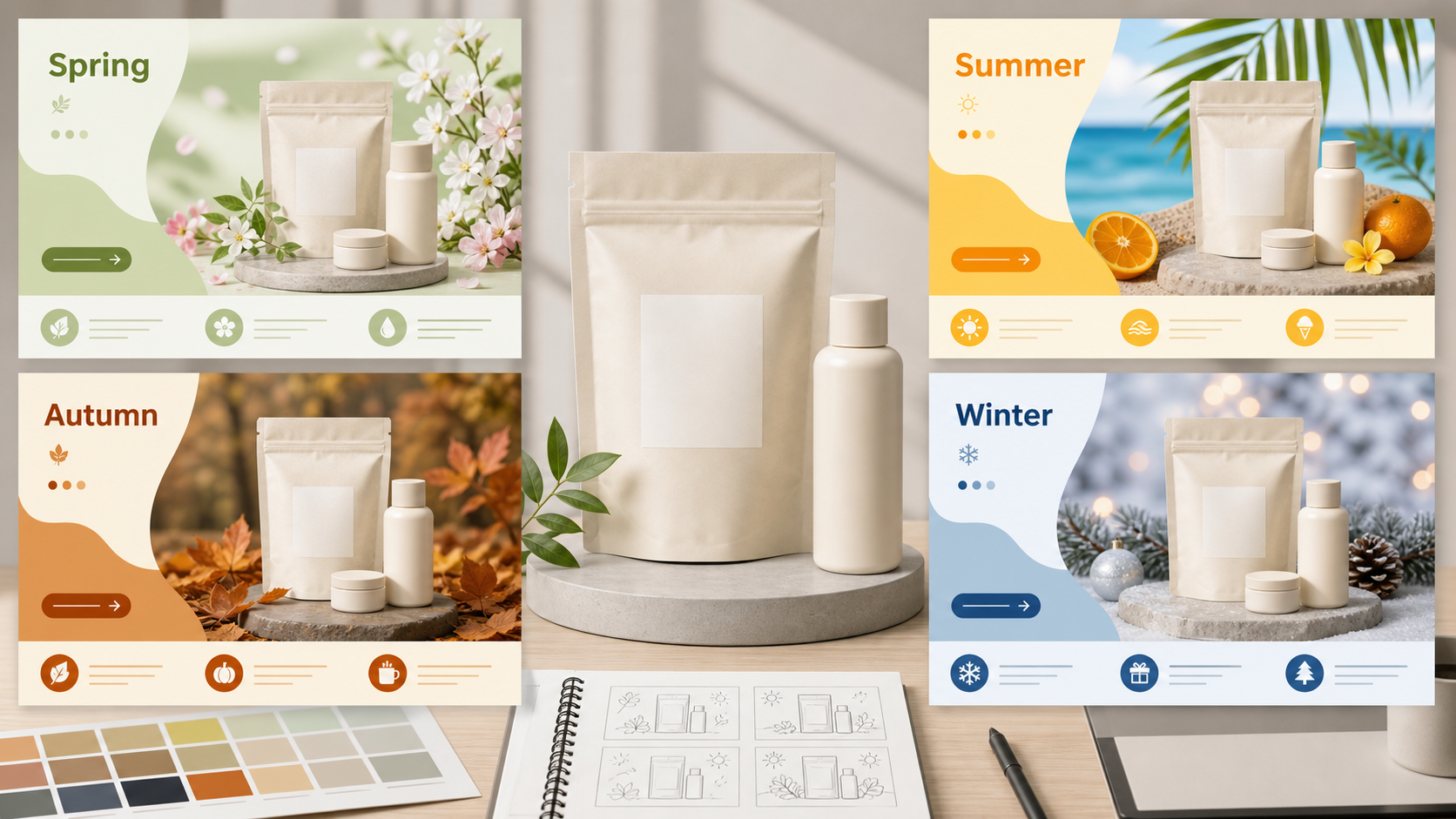
Seasonal ecommerce campaigns सिर्फ design exercise नहीं हैं; वे visual operations हैं. Spring launch image, summer drink promotion, Black Friday product banner या Chinese New Year gift box key visual, सबको एक ही कठिन काम करना होता है: product साफ दिखे, offer आसानी से समझ आए, channel के हिसाब से fit हो, और season का एहसास इतना हो कि attention मिले.
GPT Image 2 AI Online इस काम में मदद कर सकता है, क्योंकि यह उन जगहों पर सबसे उपयोगी है जहां ecommerce teams आम तौर पर समय गंवाती हैं: कई campaign directions सोचना, product scene बदलना, product-on-white drafts बनाना, seasonal color systems explore करना, multilingual layout drafts बनाना और local image edits iterate करना. सही expectation जरूरी है. GPT Image 2 AI को high-output visual production assistant की तरह इस्तेमाल करें, final legal, pricing, typography या platform-compliance system की तरह नहीं.
सबसे भरोसेमंद production pattern सरल है: AI से image foundation बनवाएं, फिर final text, prices, badges, legal copy और exact platform layout को design या editing tool में पूरा करें. इससे speed मिलती है और AI-generated campaign images की आम गलतियां कम होती हैं: गलत text, brand details का drift, भीड़भाड़ वाला layout या unsafe cropping.
यह guide GPT Image 2 AI Online इस्तेमाल करने वाली ecommerce teams के लिए research workflow को एक practical blog-ready process में बदलती है.
Ecommerce Campaign Production में GPT Image 2 AI कहां Fit होता है
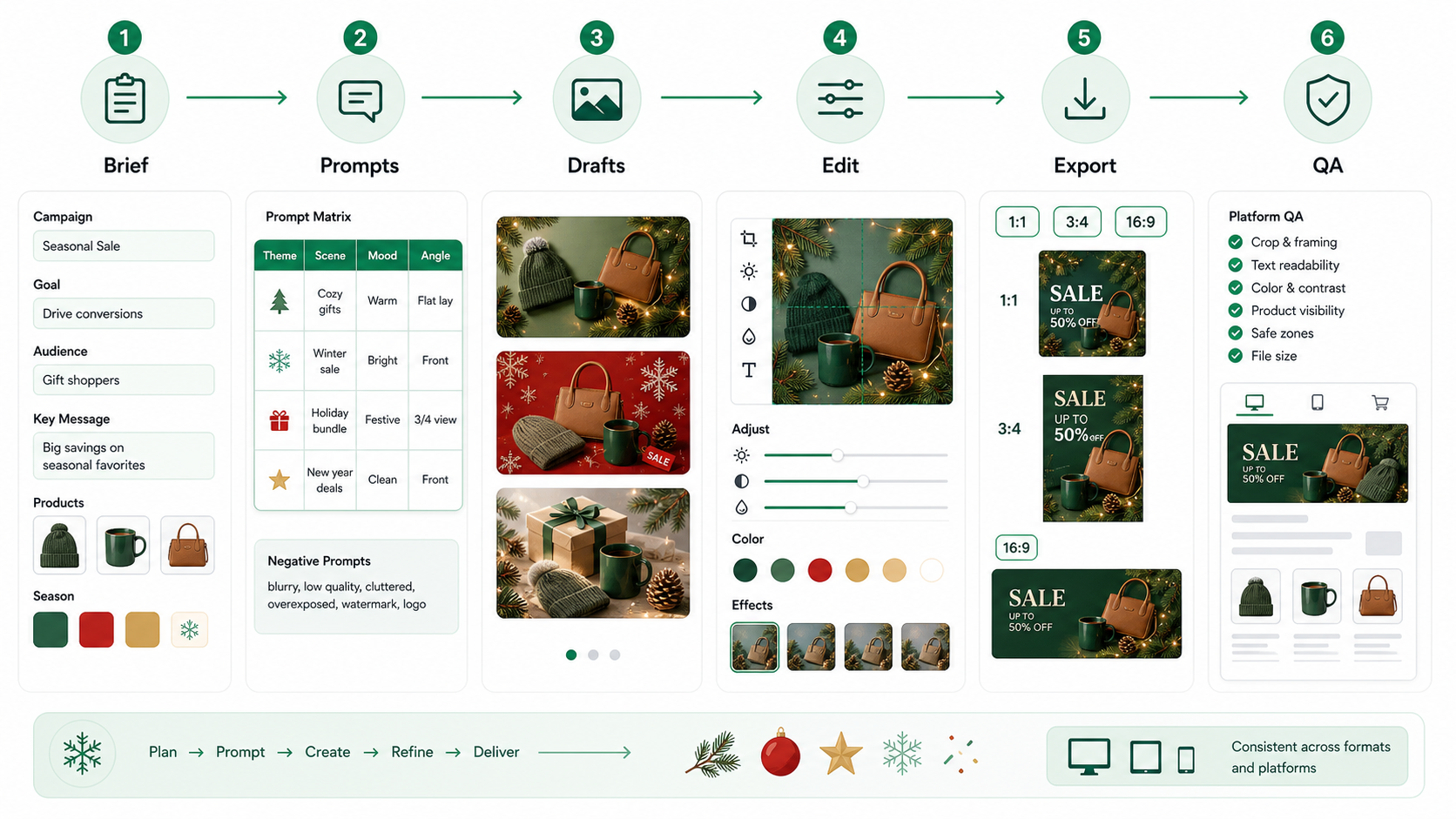
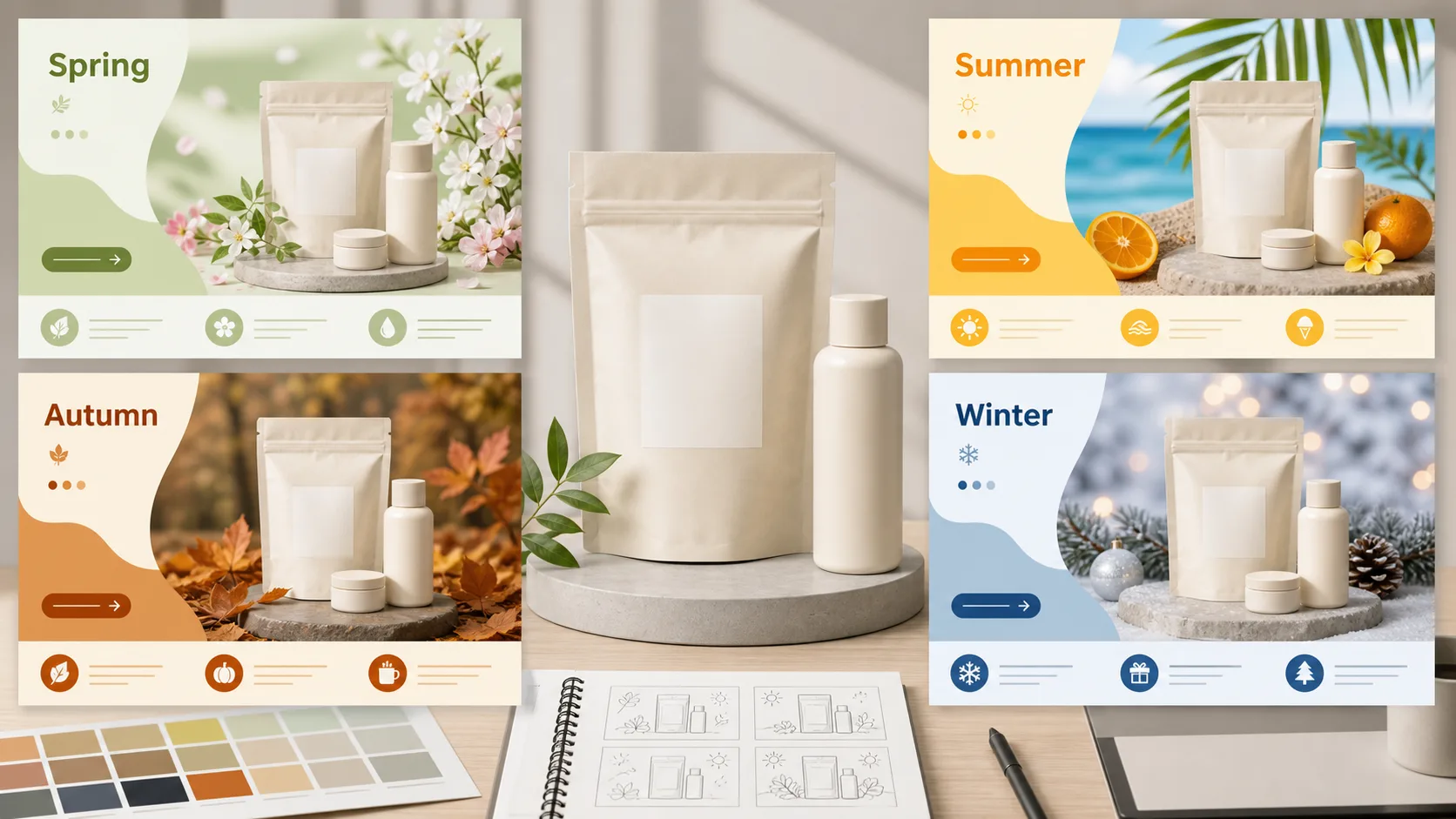
Seasonal ecommerce work में GPT Image 2 AI creative pipeline के बीच वाले हिस्से में सबसे उपयोगी है. Final production पर commit करने से पहले यह जल्दी से कई visual directions बना सकता है. यह एक single product image को कई campaign settings में भी बदल सकता है: spring freshness, summer energy, autumn warmth, winter premium texture, Singles' Day urgency, Black Friday contrast या Chinese New Year gifting.
मजबूत use cases में शामिल हैं:
- Ecommerce hero banners और marketplace images के लिए campaign backdrops.
- Product-on-white या clean product isolation drafts.
- Scene replacement, जैसे skincare bottle को spring bathroom setup में रखना.
- Color, lighting, props और composition में seasonal style exploration.
- A/B image variants, जैसे product-only vs product-with-model.
- Approximate text placement वाले draft posters, जिन्हें बाद में Figma, Canva, Photopea या किसी layout tool में rebuild किया जाए.
- 1:1, 3:4 और 16:9 placements के लिए format adaptation.
Boundary भी उतनी ही जरूरी है. Prices, discount thresholds, legal disclaimers, SKU details, marketplace service promises, ingredient claims, certification marks या brand names के लिए AI output को final source of truth न मानें. Official image model guidance में exact text, strict structured layout और repeated brand consistency को अब भी review की जरूरत वाले areas माना गया है. Ecommerce में ये मामूली polish issues नहीं हैं. ये conversion, platform rejection या compliance problems बन सकते हैं.
Practical rule: AI image generation और visual iteration संभालता है. Humans और deterministic design tools final typography, product facts, offer logic और compliance संभालते हैं.
Best Online Workflow: Seasonal Brief से Upload-Ready Assets तक
किसी magical prompt से शुरू न करें. Brief से शुरू करें. Seasonal campaign images तब बेहतर काम करती हैं जब commercial goal पहले से साफ हो.
कुछ भी generate करने से पहले define करें:
- Product या SKU family.
- Campaign season या event.
- Main channel, जैसे Shopify, Taobao/Tmall, JD, email, paid social या homepage hero.
- Primary aspect ratios: आम तौर पर 1:1, 3:4 और 16:9.
- एक main selling point.
- वे product features जिन्हें accurate रहना ही चाहिए.
- Copy, badges और price overlays के लिए safe areas.
- क्या नहीं आना चाहिए, जैसे extra products, fake logos, unauthorized people, misleading claims या image में directly generated text.
Brief fix होने के बाद यह pipeline इस्तेमाल करें:
- Seasonal prompt matrix बनाएं.
- Low-cost drafts batches में generate करें.
- एक या दो master images चुनें.
- Image editing से composition, background, lighting, product position या local defects ठीक करें.
- White-background, scene-background, vertical, square और horizontal versions बनाएं.
- Final text, price, CTA, badges और legal copy को external design tool में add करें.
- Platform-specific files export करें.
- Upload से पहले compress, preview और quality-check करें.
- A/B tests में एक बार में सिर्फ एक meaningful variable test करें.
यह workflow उस दिखावे से धीमा लग सकता है कि एक prompt final image दे देगा, लेकिन real production में यह तेज है. यह team को कमजोर concept सुधारने में समय खर्च करने से बचाता है. Asset management भी साफ रहता है: master image, editable layout, platform exports, compressed uploads और test variants को mix नहीं करना चाहिए.
Seasonal Ecommerce Images के लिए Prompt Framework
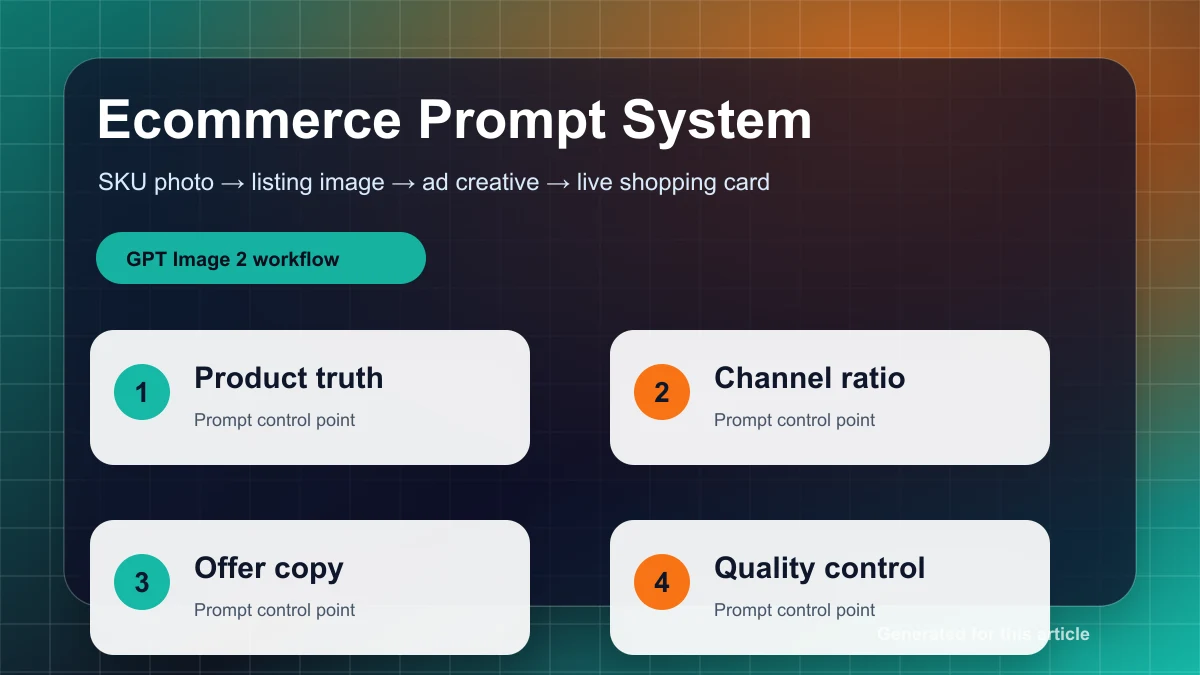
सबसे safe prompt structure poetic नहीं, operational होता है. हर बार यही eight-part structure इस्तेमाल करें:
- Use case और placement.
- Scene और season.
- Main product या person.
- Core selling point.
- Composition और negative space.
- Color और lighting.
- Must-keep elements.
- Exclusions और output requirements.
Reusable prompt form:
Create a [placement] for [season/event] ecommerce campaign.
Scene: [seasonal environment, mood, props].
Main subject: [product/person], positioned [exact placement].
Selling point: visually communicate [one main benefit], without adding final promotional text.
Composition: reserve [percentage or area] clean negative space for later copy overlay.
Color and lighting: use [palette], [lighting style], [material or texture details].
Must keep: [product shape, label, color, packaging, logo accuracy, if using an input image].
Avoid: [extra products, misspelled text, watermark, fake platform badges, unauthorized logos, crowded background].
Output: [aspect ratio or size], realistic ecommerce-ready image, no final price text.
यह structure इसलिए जरूरी है क्योंकि इससे debugging possible होती है. अगर image fail होती है, तो आप देख सकते हैं कि problem season, subject, composition, constraints या output target से आई. Batch generation भी consistent रहती है. हर बार नया prompt invent करने के बजाय आप seasons के across वही structure reuse कर सकते हैं.
Draft generation में एक image पर अटकने के बजाय variants से शुरू करें. Practical rhythm है: हर concept के लिए 4 से 8 drafts, फिर best एक या दो directions चुनना. जहां quality settings उपलब्ध हों, early drafts के लिए lower quality रखें, फिर final candidates के लिए medium या high quality पर जाएं. API workflow में meaningful controls size, quality, number of outputs, output format, compression और moderation हैं. Production process को unsupported या unstable assumptions पर न बनाएं, जैसे universal style parameter, seed-based reproducibility या guaranteed transparent-background output.
अगर consistency चाहिए, तो master image चुनें और उसी image से iterate करें. Same prompt को scratch से repeat करना campaign system maintain करने जैसा नहीं है.
Ecommerce Campaigns के लिए Seasonal Design System
Seasonal images सिर्फ decorative props की बात नहीं हैं. अच्छे ecommerce visuals seasonal expectations को conversion-friendly composition में translate करते हैं. Product mobile size पर भी readable होना चाहिए. Offer area clear होना चाहिए. Image cropping survive करनी चाहिए.
नीचे दिए system को production starting point की तरह इस्तेमाल करें, फिर अपने brand के हिसाब से adapt करें.
| Season या Event | Color Direction | Composition | Typography Plan | A/B Variables |
|---|---|---|---|---|
| Spring | Cherry blossom pink, fresh green, cream white | Light atmosphere, soft morning light, product centered या थोड़ा right, 30-40% clean copy space | Final layout में light sans serif या rounded sans serif | Model vs product-only, pink-led vs green-led palette |
| Summer | Ocean blue, lemon yellow, white, deep navy contrast | High brightness, splash, ice, outdoor light, diagonal या wave movement | Bold sans serif, short headlines, large simple numbers | Cool ice feeling vs tropical warm feeling, close-up vs wider scene |
| Autumn | Caramel, wheat gold, deep brown, warm ivory | Layered textures, wood, fabric, leaves, warm window light | Serif headline plus simple sans serif support text | Lifestyle scene vs still life, premium low-density design vs promotion-heavy design |
| Winter | Deep blue, cold white, snow white, pale violet | Central product, glass, steam, reflection, subtle snow particles | Narrow sans serif या light serif, fewer words, generous spacing | Cool blue technology style vs red festive accent, glossy vs soft home lighting |
| Chinese New Year | Red, gold, ivory, refined festive accents | Symmetry, gift boxes, lattice, lantern, red envelope details, लेकिन clutter से बचें | Post-production में modern Chinese-style serif या clean black type | Strong red-gold version vs premium cream-gold version, symbolic props vs minimal gift scene |
| Singles' Day | Black, red, white, yellow accent | High contrast, speed lines, angular geometry, clear product focus | Heavy compressed sans serif, hierarchy first | Large price zone vs large benefit zone, one badge vs multiple badges |
| Black Friday | Black, charcoal, silver white, gold | Spotlight, central product, minimal negative space, strong contrast | Final design में uppercase bold sans serif | Black-gold premium vs black-red urgency, single product vs product bundle |
ये platform rules नहीं हैं. ये visual production defaults हैं. काम है product को obvious रखना और हर campaign को seasonal reason देना.
Adapt करने योग्य Prompt Examples
इन्हें starting points की तरह इस्तेमाल करें, guaranteed outputs की तरह नहीं.
Spring Skincare Launch Hero
Spring skincare launch hero banner, cherry blossom pink and light green palette, single serum bottle centered slightly right, keep 35% clean negative space on the left for later copy overlay, real morning light, delicate glass reflections, very few petals, airy composition, no text, no watermark.Suggested use: homepage hero, paid social banner, new product launch page. Suggested format: horizontal 16:9 या 3:2 master, फिर platform needs के हिसाब से crop.
Summer Drink Campaign
Summer cold drink campaign visual, transparent sparkling beverage cup with clear ice cubes and condensation, blue-yellow contrast, portrait ecommerce composition, product occupies about 60% of frame, top area reserved for price overlay, strong summer sunlight, realistic photography, no extra products, no text.Suggested use: mobile feed, marketplace vertical image, summer promotion tile.
Autumn Knitwear Lookbook
Autumn knitwear campaign visual, caramel brown and ivory palette, half-body model wearing the knitwear, softly blurred wooden interior with warm window light, reserve copy space on the right, realistic fabric texture, no logo, no extra text, premium ecommerce photography.Suggested use: fashion collection launch, brand lookbook, social ad creative.
Winter Home Appliance Promo
Winter home appliance promo image, warm-white humidifier on a cool blue background, subtle snow particles and glass reflections, front-facing product centered, reserve CTA space at the bottom, clean premium look, realistic materials, no price text, no watermark.Suggested use: marketplace main image, product carousel, winter home campaign.
Chinese New Year Gift Box Key Visual
Chinese New Year gift box key visual, cream background with refined red-and-gold lattice details, premium gift box centered, subtle gold foil texture, festive but restrained mood, reserve brand area on top and campaign area below, no people, no busy background, no text.Suggested use: gifting category landing page, holiday hero image, product detail page banner.
Singles' Day Promotion Backdrop
Singles' Day campaign backdrop, black-red high contrast, one hero product in center, angular speed-line geometry in background, reserve large price-number area on top, reserve space for three feature badges at the bottom, aggressive ecommerce promo style, no real text, no watermark.Suggested use: high-intensity promotional image जहां final numbers और badges बाद में add होंगे.
Product-on-White Edit Prompt
Extract the product from the input image and place it on a plain white opaque background. Center the product. Keep a crisp silhouette with no halo or fringing. Preserve product geometry, packaging color, and label legibility. Add only light polish and a subtle realistic contact shadow. Do not redesign the product.Suggested use: product listing images, marketplace uploads, clean secondary images.
Accuracy जरूरी हो तो Generated Image में Text न रखें
GPT Image 2 AI ऐसी images बना सकता है जो posters, ads या multilingual layouts जैसी दिखती हैं. इसका मतलब यह नहीं कि generated text production-safe है. Ecommerce में final price, discount, CTA, coupon threshold, legal note, product claim, service promise और platform badge generation के बाद add होने चाहिए.
सबसे safe method:
- Clean copy space वाली image generate करें.
- जब तक headline concept intentionally test न कर रहे हों, "no text" या "no final promotional text" लिखें.
- Text को Figma, Canva, Photopea, Photoshop या ecommerce platform editor में add करें.
- Brand fonts, approved colors और locked offer copy इस्तेमाल करें.
- Upload के लिए flattened version export करें और editable layout file रखें.
अगर AI-generated headline placement test करते हैं, तो उसे mockup मानें. Publish करने से पहले text rebuild करें. Multilingual campaign images में यह खास जरूरी है, क्योंकि कोई phrase देखने में सही लग सकता है लेकिन अर्थ, tone या brand-approved wording से गलत हो सकता है.
Export और Platform Adaptation
अच्छा ecommerce image system high-quality master से शुरू होता है और कई platform versions export करता है. एक image बनाकर यह उम्मीद न करें कि हर platform crop काम करेगा.
अधिकतर seasonal campaign work के लिए तैयार करें:
- Marketplace main images, grids और social feeds के लिए 1:1 square version.
- Mobile-first listings, vertical recommendation slots और product detail entry images के लिए 3:4 vertical version.
- Homepage heroes, collection banners और ads के लिए 16:9 या wide horizontal version.
- Marketplace rules या listing clarity की जरूरत होने पर product-on-white version.
- Platform को long-form product storytelling चाहिए तो detail-page slices.
Shopify-style storefronts के लिए high-resolution product imagery, consistent aspect ratios और JPEG या WebP जैसे compressed delivery formats उपयोगी हैं. कई product images के लिए 2048x2048 square master practical baseline है, जबकि hero banners को theme cropping पर निर्भर करने के बजाय अलग compose करना चाहिए.
Taobao/Tmall-style use cases में यह assume न करें कि एक fixed pixel size हमेशा लागू रहेगा. Public platform guidance ने category-specific और scenario-specific validation दिखाया है, जिसमें 1:1 और 3:4 image requirements शामिल हैं. Square और vertical masters दोनों तैयार करें, फिर current merchant backend या category schema में दिखी exact requirement के अनुसार export करें.
JD-style use cases में कम से कम तीन families तैयार करें: square main image, 3:4 long image और detail-page images. Public rule fragments ने category variation, file-size limits, white-background preferences और long-detail-image constraints दिखाए हैं. Safe operational habit है upload से पहले current seller backend check करना.
मुख्य बात: platform upload limits good frontend performance जैसी चीज नहीं हैं. High-quality archive master रखें, फिर upload copies को display size के करीब compress करें. Photographic campaign images के लिए JPEG या WebP इस्तेमाल करें. PNG सिर्फ तब इस्तेमाल करें जब sharp graphic edges चाहिए हों या editing pipeline को इसका स्पष्ट फायदा हो.
Publishing से पहले Quality Control
किसी भी seasonal ecommerce image को live करने से पहले छोटी QA checklist चलाएं:
- Product shape, packaging, color और label use case के लिए पर्याप्त accurate हैं.
- कोई extra product variants गलती से नहीं आए.
- कोई generated price, coupon, trademark, certification mark या fake platform badge मौजूद नहीं है.
- Copy space clean है और visual noise से भरा नहीं है.
- Product mobile पर readable रहता है.
- Cropping 1:1, 3:4 और wide formats में काम करती है.
- Final text controlled design tool में add हुआ है.
- Compression के बाद file size reasonable है.
- Image unsupported claims, official platform endorsement या unavailable product features imply नहीं करती.
- सभी input images, product photos, model photos, brand assets और logos के rights आपके पास हैं.
अगर uploaded model images, influencer images, packaging art, competitor visuals या third-party brand marks इस्तेमाल कर रहे हैं, तो पहले usage rights confirm करें. Consent के बिना किसी व्यक्ति को advertising subject में बदलने के लिए AI editing का इस्तेमाल न करें. Unauthorized logos को commercial campaign में न डालें. Platform badge या official-looking language का इस्तेमाल तभी करें जब claim सच और allowed हो.
AI-generated image metadata और provenance systems traceability में मदद कर सकते हैं, लेकिन वे compliance shield नहीं हैं. Screenshots, resizing और re-encoding metadata हटा सकते हैं. Missing credential यह prove नहीं करता कि image AI-generated नहीं है, और credential review responsibility हटाता नहीं.
A/B Testing: कम चीजें Test करें, ज्यादा सीखें
Seasonal campaigns अक्सर इसलिए fail होते हैं क्योंकि teams एक साथ बहुत सारे visual changes test करती हैं. अगर एक version में color palette, product size, model, ज्यादा badges, new price style और अलग crop सब बदल गए, तो result ज्यादा नहीं बताएगा.
एक बार में एक high-impact variable test करें:
- Product size: frame का 55% vs 75%.
- Product-only vs product-with-person.
- Clean background vs lifestyle scene.
- Single benefit vs multiple benefit badges.
- 1:1 square vs 3:4 vertical.
- Cool palette vs warm palette.
- AI-drafted headline concept vs professionally typeset final headline.
Aggressive sale events में test करें कि एक बड़ा benefit crowded information board से बेहतर है या नहीं. Brand-led seasonal launches में test करें कि product close-up lifestyle scene से बेहतर है या नहीं. ये tests style adjectives लगातार बदलने से ज्यादा उपयोगी हैं.
Final Takeaway
GPT Image 2 AI Online seasonal ecommerce के लिए valuable है क्योंकि यह teams को ज्यादा campaign directions तेजी से बनाने में मदद करता है. इसका best role पूरा design process replace करना नहीं है. इसका best role process को restructure करना है: structured brief, prompt matrix, low-cost drafts, master image selection, image editing, external typography, multi-size export, compression, platform QA और focused A/B testing.
इसे visual speed के लिए इस्तेमाल करें. Final text, rights checks, platform rules और commercial claims को human control में रखें. यही fast image और usable ecommerce asset के बीच का फर्क है.